
Mosaic Help Center
Mosaic Support
Everything you need to understand how Mosaic works, how to build your professional record, and how to get the most out of your CGA membership. Find your topic below or use the navigation to jump to the right section.
Introduction
Introduction
Mosaic is the professional home for your creative work. Built by the Creators Guild of America, it is the first platform designed to verify, organize, and publicly display a creator's body of work in a way that is authenticated, searchable, and built to last. Your career is more than a follower count or a job title. Mosaic gives it a permanent, credible record.
Every project you have contributed to, every brand you have worked with, every collaboration you have been part of, it all belongs somewhere. That place is Mosaic. Credits you earn on Mosaic are also reviewed through the CGA's Accreditation program. Accredited Credits will be eligible for CGA Awards recognition, making your work not just visible, but celebrated.
Mosaic is the professional home for your creative work. Built by the Creators Guild of America, it is the first platform designed to verify, organize, and publicly display a creator's body of work in a way that is authenticated, searchable, and built to last. Your career is more than a follower count or a job title. Mosaic gives it a permanent, credible record.
Every project you have contributed to, every brand you have worked with, every collaboration you have been part of, it all belongs somewhere. That place is Mosaic. Credits you earn on Mosaic are also reviewed through the CGA's Accreditation program. Accredited Credits will be eligible for CGA Awards recognition, making your work not just visible, but celebrated.
What is Mosaic
Mosaic is a verified credits platform built exclusively for creators. Think of it as the IMDb for the creator economy: a public, searchable record of your professional work that goes beyond listing where you have been and shows exactly what you have done.
Unlike a resume or a social media profile, every entry on Mosaic is tied to a specific project, a specific role, and a specific company or client. Your work is represented through Credits, which are authenticated records that confirm your contributions in a way that anyone in the industry can find, trust, and reference.
Mosaic is a verified credits platform built exclusively for creators. Think of it as the IMDb for the creator economy: a public, searchable record of your professional work that goes beyond listing where you have been and shows exactly what you have done.
Unlike a resume or a social media profile, every entry on Mosaic is tied to a specific project, a specific role, and a specific company or client. Your work is represented through Credits, which are authenticated records that confirm your contributions in a way that anyone in the industry can find, trust, and reference.
What is a Credit?
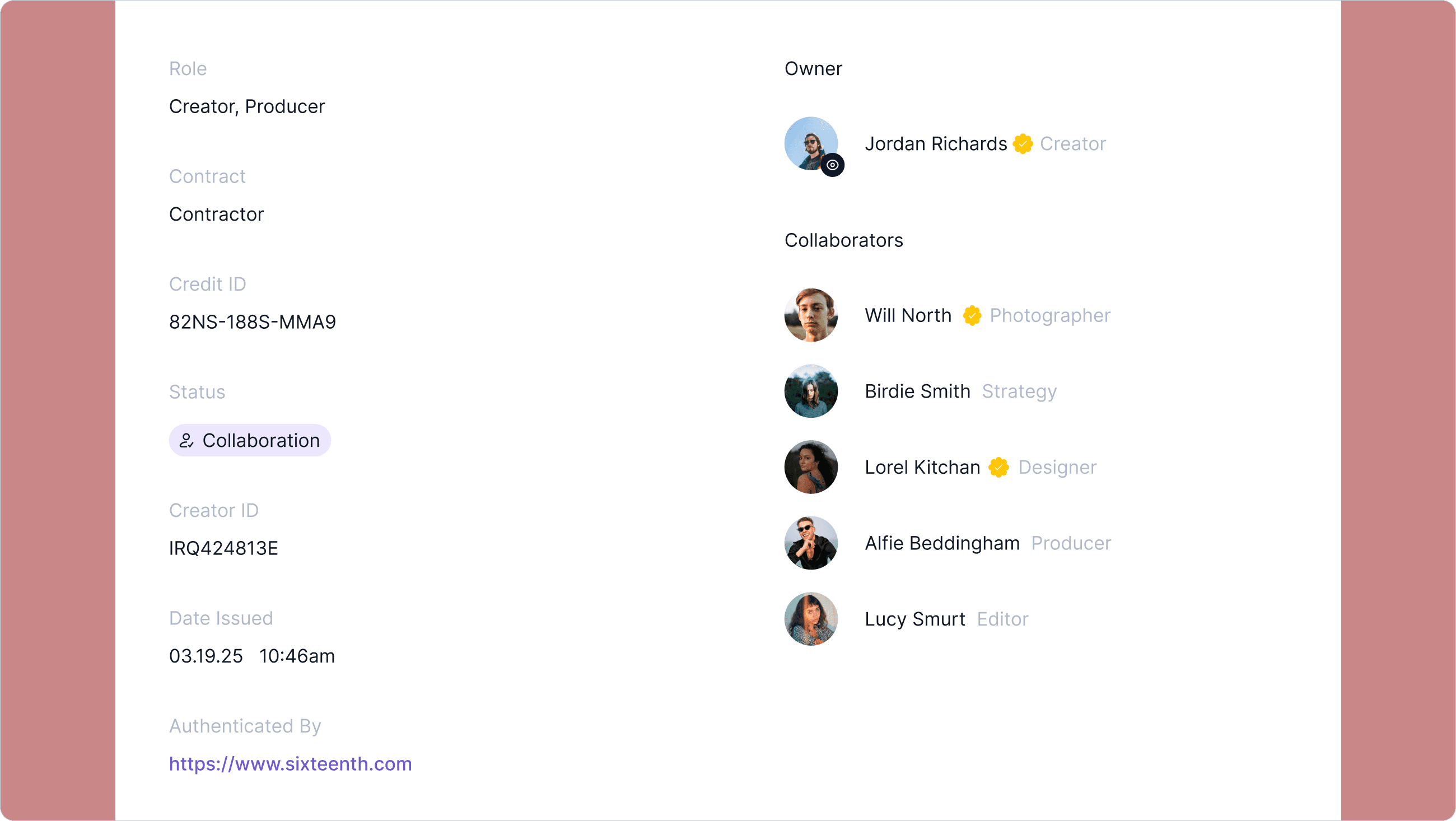
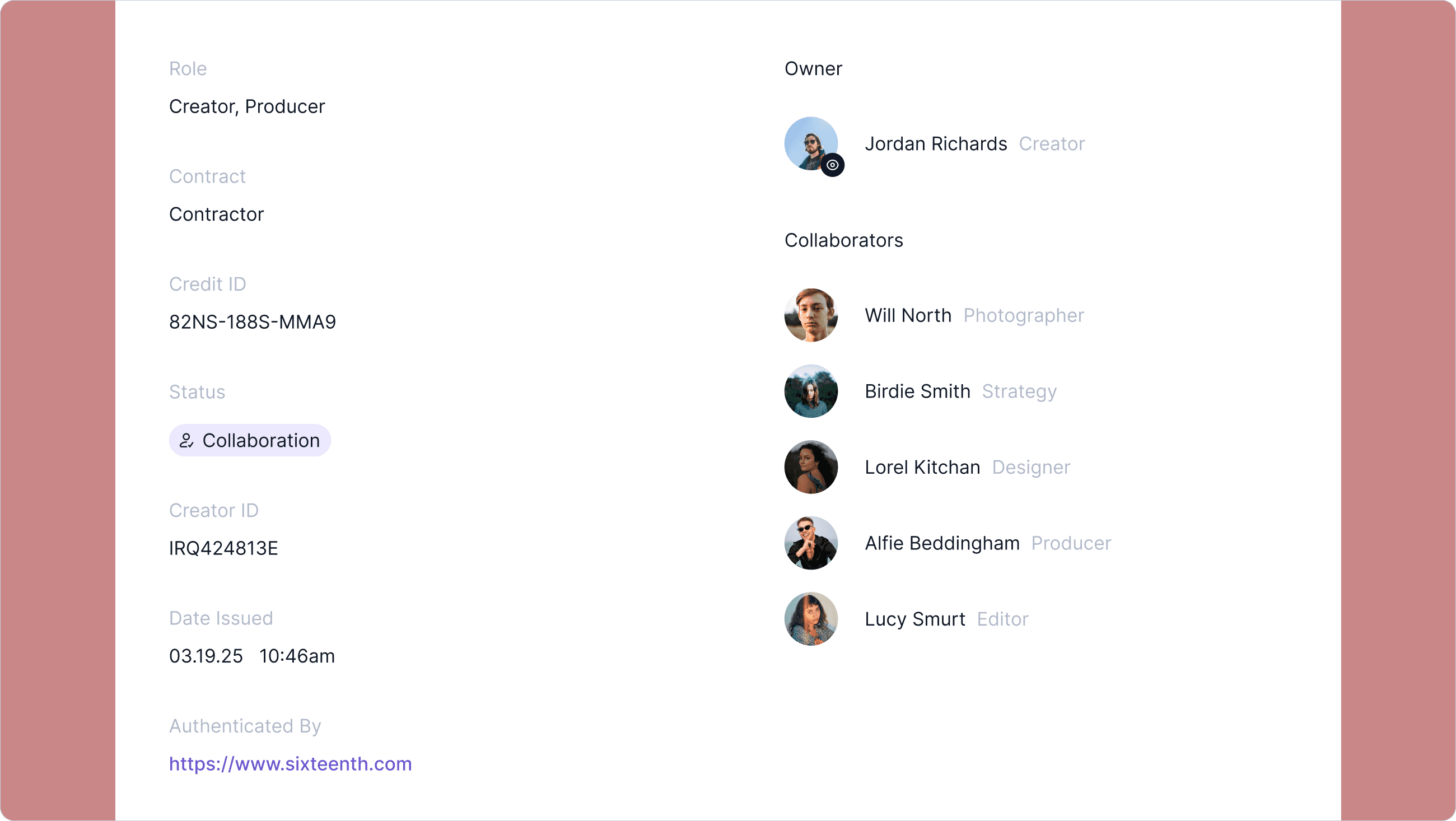
A Credit is a verified record of a single professional project or contribution. Each Credit captures the details that actually matter: the project description, the company or client it was completed for, your role, your contract type, the date it was issued, and any collaborators who worked alongside you.
Credits are not self-published claims. They are authenticated by the company or client associated with the work, which is what makes them credible. Once authenticated, a Credit becomes a permanent, public part of your professional record on Mosaic.
A Credit is a verified record of a single professional project or contribution. Each Credit captures the details that actually matter: the project description, the company or client it was completed for, your role, your contract type, the date it was issued, and any collaborators who worked alongside you.
Credits are not self-published claims. They are authenticated by the company or client associated with the work, which is what makes them credible. Once authenticated, a Credit becomes a permanent, public part of your professional record on Mosaic.
What is Creator ID?
Your Creator ID is your permanent professional identifier in the creator economy. It is a unique alphanumeric code assigned to you when you join Mosaic, and it travels with you regardless of what platforms you use, what companies you work with, or how your career evolves. Your Creator ID is attached to every Credit you earn, making your body of work traceable, verifiable, and entirely yours.
Your Creator ID is your permanent professional identifier in the creator economy. It is a unique alphanumeric code assigned to you when you join Mosaic, and it travels with you regardless of what platforms you use, what companies you work with, or how your career evolves. Your Creator ID is attached to every Credit you earn, making your body of work traceable, verifiable, and entirely yours.
Getting Started
Getting Started
Setting up your Mosaic profile takes just a few minutes. Once you are in, you will have everything you need to start building your professional record and getting your work seen.
Setting up your Mosaic profile takes just a few minutes. Once you are in, you will have everything you need to start building your professional record and getting your work seen.
Registration
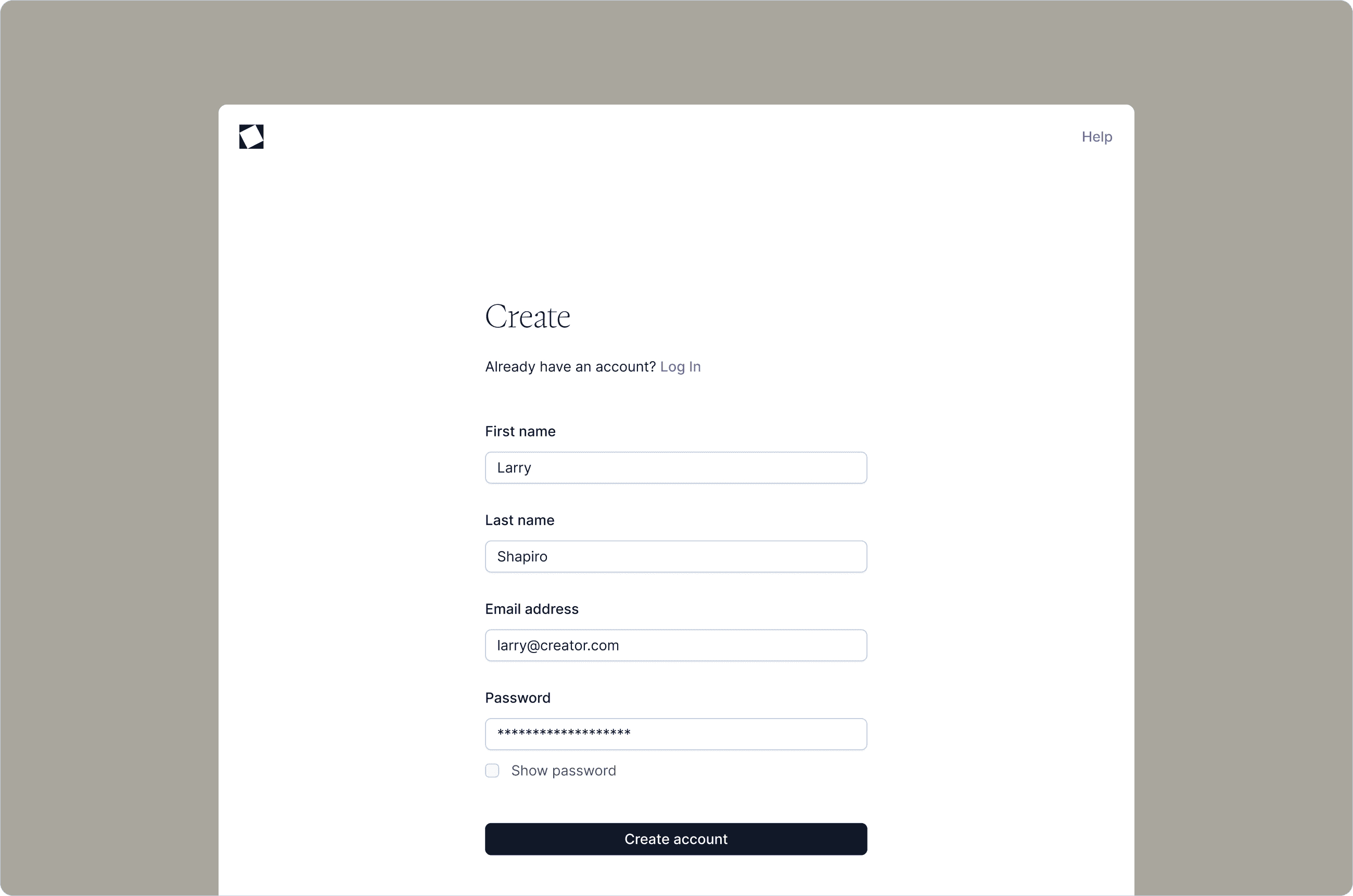
To get started, create your free account. You will enter your first name, last name, email address, and a password. Once submitted, you will receive a confirmation email. Click the link inside to activate your account and access your profile.
To get started, create your free account. You will enter your first name, last name, email address, and a password. Once submitted, you will receive a confirmation email. Click the link inside to activate your account and access your profile.
Email Confirmation
\After registering, check your inbox for a confirmation email from Mosaic. Click the confirmation link to verify your email address and activate your account. If you do not see it within a few minutes, check your spam or junk folder.
\After registering, check your inbox for a confirmation email from Mosaic. Click the confirmation link to verify your email address and activate your account. If you do not see it within a few minutes, check your spam or junk folder.
Profile
Your Mosaic profile is your public professional presence. It displays your Creator ID, your bio, your role, and all of the Credits you have earned. Anyone searching the platform can find your profile by your name or username, making it important to keep it accurate and up to date.
Your Mosaic profile is your public professional presence. It displays your Creator ID, your bio, your role, and all of the Credits you have earned. Anyone searching the platform can find your profile by your name or username, making it important to keep it accurate and up to date.
Bio
Your Bio appears at the top of your profile. It includes your name, username, current role, a short description about yourself, and an optional external link such as your personal website, online portfolio, or LinkedIn profile. You can update your Bio at any time through the Account section in your navigation.
Your Bio appears at the top of your profile. It includes your name, username, current role, a short description about yourself, and an optional external link such as your personal website, online portfolio, or LinkedIn profile. You can update your Bio at any time through the Account section in your navigation.
Role
Your role reflects your current professional position or primary creative discipline. It appears on your profile and on every Credit you create, helping brands, collaborators, and industry professionals understand who you are and what you do. If you are not currently working, or are self employed, you can select those either of those roles and the CGA will appear as a temporary domain attached. You can update your role at any time in your Account Settings.
Your role reflects your current professional position or primary creative discipline. It appears on your profile and on every Credit you create, helping brands, collaborators, and industry professionals understand who you are and what you do. If you are not currently working, or are self employed, you can select those either of those roles and the CGA will appear as a temporary domain attached. You can update your role at any time in your Account Settings.
Image
Your profile photo helps others recognize you across the platform. Upload a clear, professional image through your Account Settings. This photo will appear on your profile and alongside any Credits where you are listed as a collaborator.
Your profile photo helps others recognize you across the platform. Upload a clear, professional image through your Account Settings. This photo will appear on your profile and alongside any Credits where you are listed as a collaborator.
Role
Your role on Mosaic represents your current job or professional position, and it plays an important part in how you present yourself on the platform. It not only informs others about your current professional status but also helps in establishing your professional identity within the Mosaic community.
Your role on Mosaic represents your current job or professional position, and it plays an important part in how you present yourself on the platform. It not only informs others about your current professional status but also helps in establishing your professional identity within the Mosaic community.
Username
Your username is your unique handle on Mosaic. When you register, you will be assigned a default username, but you should update it to something that reflects your name or professional brand as soon as possible. Your username appears on your profile URL and makes it easy for others to find and share your work. You can change your username in your Account Settings.
Your username is your unique handle on Mosaic. When you register, you will be assigned a default username, but you should update it to something that reflects your name or professional brand as soon as possible. Your username appears on your profile URL and makes it easy for others to find and share your work. You can change your username in your Account Settings.
Search
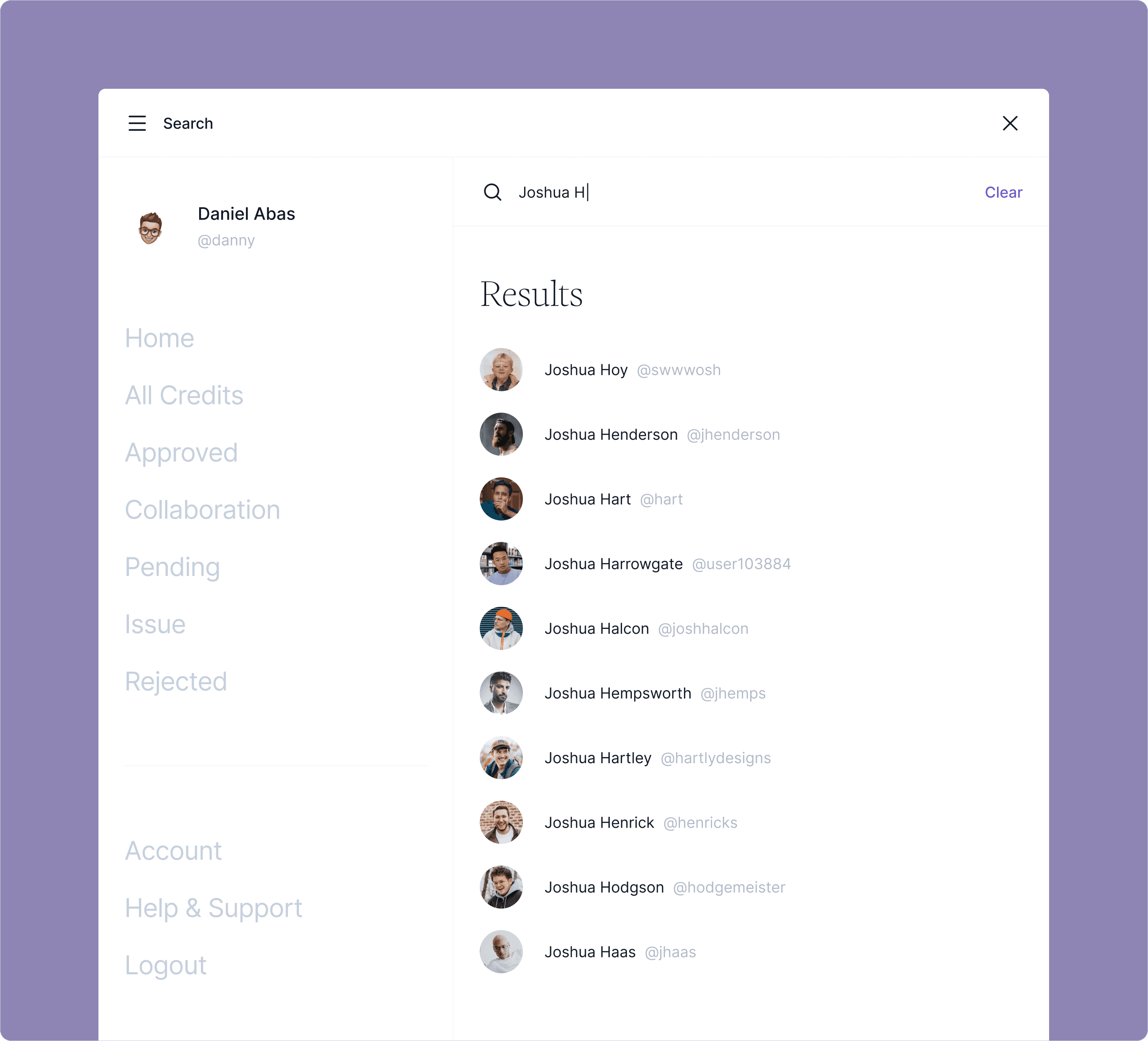
To find other creators on Mosaic, click the menu icon in the top left corner of the header. From there you will see a Search option. You can search by name, username, company, or role to browse profiles and discover collaborators across the platform.
To find other creators on Mosaic, click the menu icon in the top left corner of the header. From there you will see a Search option. You can search by name, username, company, or role to browse profiles and discover collaborators across the platform.
Credits
Just below your Bio, you will see your Credits. These are the authenticated records of your professional work. When you first create your account, this section will be empty. Click the "Add Credit" button in the top right corner of your profile to begin adding your first one. Full instructions for creating a Credit are covered in the Credits section of this guide.
Just below your Bio, you will see your Credits. These are the authenticated records of your professional work. When you first create your account, this section will be empty. Click the "Add Credit" button in the top right corner of your profile to begin adding your first one. Full instructions for creating a Credit are covered in the Credits section of this guide.
Credits
What is a Credit?
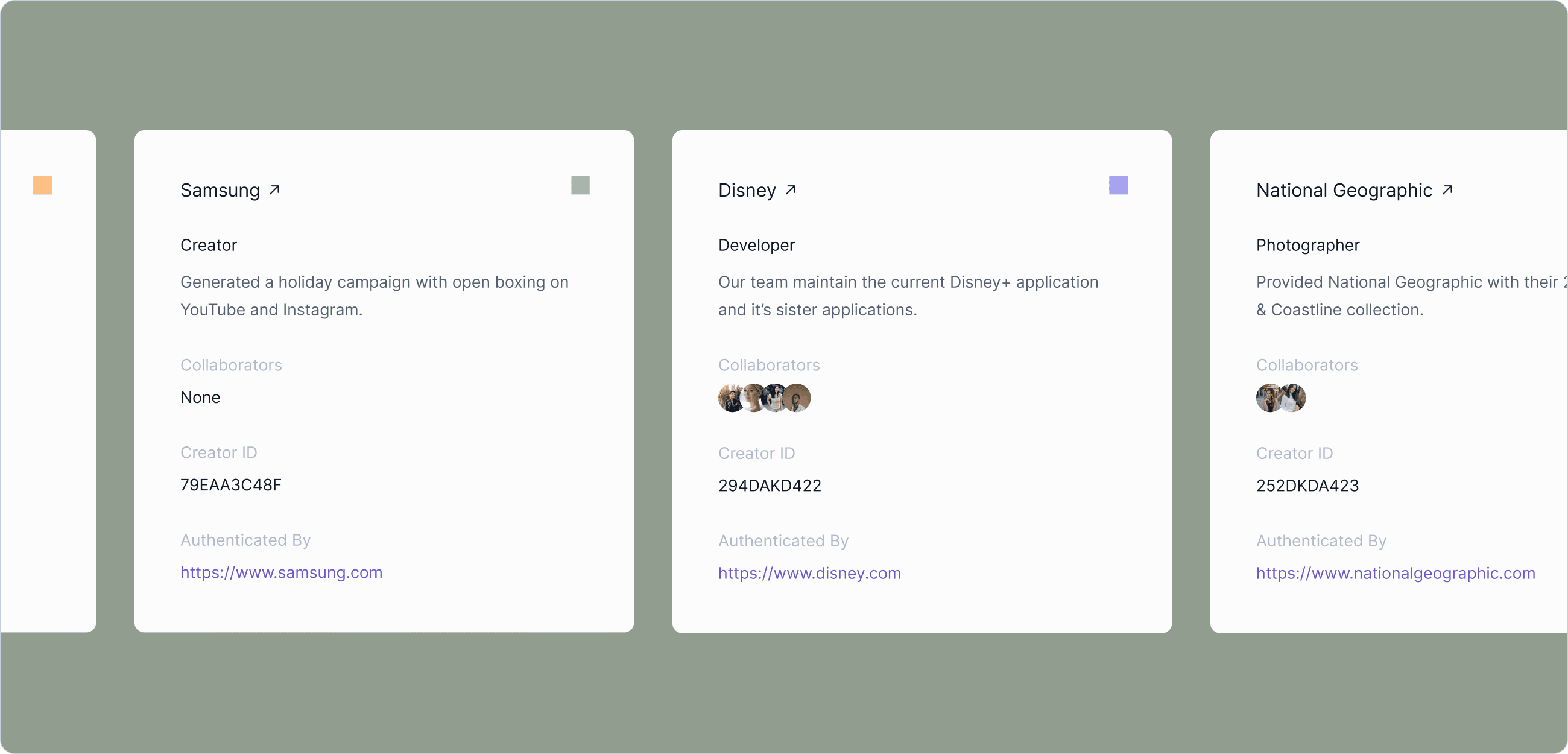
Your Credits are the foundation of your Mosaic profile. Each one is a verified, authenticated record of a project you contributed to, built to show the creator economy exactly what you have done and who you have done it with. A Credit is not a self-published claim. It is a professionally authenticated record, which is what separates Mosaic from every other portfolio tool available to creators today.
As your Credits grow, they build a body of work that is permanent, searchable, and credible. Credits are also reviewed through the CGA Accreditation program, and accredited work will be eligible for CGA Awards recognition.
Your Credits are the foundation of your Mosaic profile. Each one is a verified, authenticated record of a project you contributed to, built to show the creator economy exactly what you have done and who you have done it with. A Credit is not a self-published claim. It is a professionally authenticated record, which is what separates Mosaic from every other portfolio tool available to creators today.
As your Credits grow, they build a body of work that is permanent, searchable, and credible. Credits are also reviewed through the CGA Accreditation program, and accredited work will be eligible for CGA Awards recognition.
What does a Credit contain?
Each Credit captures the following information:
Project: A description of the work and what it involved
Company or Client: The brand, agency, or organization the work was completed for
Your Role: Your specific title or function on the project
Contract Type: Whether the engagement was freelance, agency, employment, or another arrangement
Collaborators: Any other creators or professionals who contributed to the project
Date Issued: When the Credit was authenticated and added to your record
Credit ID: A unique identifier assigned to each Credit
Authenticated By: The verified domain of the company or client that confirmed the work
Each Credit captures the following information:
Project: A description of the work and what it involved
Company or Client: The brand, agency, or organization the work was completed for
Your Role: Your specific title or function on the project
Contract Type: Whether the engagement was freelance, agency, employment, or another arrangement
Collaborators: Any other creators or professionals who contributed to the project
Date Issued: When the Credit was authenticated and added to your record
Credit ID: A unique identifier assigned to each Credit
Authenticated By: The verified domain of the company or client that confirmed the work
Creating a Credit
o add a new Credit, visit mosaic.creatorsguildofamerica.org and click "Add Credit" in the top right corner of your profile.
You will be guided through the following steps:
Step 1:
Enter the Company or Client Begin by entering the name of the company, brand, or client the work was completed for. Mosaic will search for the organization in the system. If it appears, select it. If it does not, you can manually add it by entering the company name and its official website domain.
Step 2:
Add a Credit Approver You will need to provide the name and professional email address of someone at the company who can verify your contribution. This must be a company email address connected to the organization's domain. Personal email addresses such as Gmail or Yahoo are not accepted, as Mosaic requires the authentication to come from a verified organizational source.
Step 3:
Describe Your Work Write a clear description of the project and your specific contribution. Be detailed enough that anyone reading it understands what the work involved and what role you played.
Step 4:
Select Your Role and Contract Type Choose the title or role that best reflects your position on the project, and indicate whether the engagement was freelance, agency, employment, or another contract type.
Step 5:
Add Collaborators If others contributed to the project, you can append them to the credit by sending an invitation to their email address. They will be notified and their name will appear on the Credit once it is authenticated.
Step 6:
Submit for Approval Once all details are complete, submit your Credit. The Credit Approver you listed will receive an email asking them to confirm your contribution. When they approve it, your Credit becomes authenticated and goes live on your profile.
To add a new Credit, log into your account and click "Add Credit" in the top right corner of your profile.
You will be guided through the following steps:
Step 1:
Enter the Company or Client Begin by entering the name of the company, brand, or client the work was completed for. Mosaic will search for the organization in the system. If it appears, select it. If it does not, you can manually add it by entering the company name and its official website domain.
Step 2:
Add a Credit Approver You will need to provide the name and professional email address of someone at the company who can verify your contribution. This must be a company email address connected to the organization's domain. Personal email addresses such as Gmail or Yahoo are not accepted, as Mosaic requires the authentication to come from a verified organizational source.
Step 3:
Describe Your Work Write a clear description of the project and your specific contribution. Be detailed enough that anyone reading it understands what the work involved and what role you played.
Step 4:
Select Your Role and Contract Type Choose the title or role that best reflects your position on the project, and indicate whether the engagement was freelance, agency, employment, or another contract type.
Step 5:
Add Collaborators If others contributed to the project, you can append them to the credit by sending an invitation to their email address. They will be notified and their name will appear on the Credit once it is authenticated.
Step 6:
Submit for Approval Once all details are complete, submit your Credit. The Credit Approver you listed will receive an email asking them to confirm your contribution. When they approve it, your Credit becomes authenticated and goes live on your profile.
More Details:
Company Information
Start by entering the name of the company, brand, or client the work was completed for. As you type, Mosaic will search for the organization in the system. If it appears, select it to ensure the Credit is linked to the correct verified entity.
If the company does not appear, you can add it manually by entering the company name and its official website domain. The domain is important because it is how Mosaic authenticates the organization and connects it to the Credit Approver you will assign in the next step.
Start by entering the name of the company, brand, or client the work was completed for. As you type, Mosaic will search for the organization in the system. If it appears, select it to ensure the Credit is linked to the correct verified entity.
If the company does not appear, you can add it manually by entering the company name and its official website domain. The domain is important because it is how Mosaic authenticates the organization and connects it to the Credit Approver you will assign in the next step.
Credit Approver
The Credit Approver is the person at the company who will confirm that you completed the work described in your Credit. You will need to provide their name and a professional email address connected to the company's official domain.
Personal email addresses such as Gmail, Yahoo, or iCloud are not accepted. The approver must be reachable at a company domain email so that Mosaic can verify the authentication is coming from a legitimate organizational source. If you are unsure who to list, choose a direct manager, a producer, a brand contact, or anyone at the company who has firsthand knowledge of your contribution.
The Credit Approver is the person at the company who will confirm that you completed the work described in your Credit. You will need to provide their name and a professional email address connected to the company's official domain.
Personal email addresses such as Gmail, Yahoo, or iCloud are not accepted. The approver must be reachable at a company domain email so that Mosaic can verify the authentication is coming from a legitimate organizational source. If you are unsure who to list, choose a direct manager, a producer, a brand contact, or anyone at the company who has firsthand knowledge of your contribution.
Roles
Select the role that best reflects your specific contribution to the project. Your role tells anyone viewing your Credit exactly what you did, not just where you worked. Be as accurate as possible. If your title was unique to that project or client, choose the option that most closely matches your actual function. Your role also appears on your public Mosaic profile and contributes to how your work is categorized and discovered across the platform.
Select the role that best reflects your specific contribution to the project. Your role tells anyone viewing your Credit exactly what you did, not just where you worked. Be as accurate as possible. If your title was unique to that project or client, choose the option that most closely matches your actual function. Your role also appears on your public Mosaic profile and contributes to how your work is categorized and discovered across the platform.
Project Details
Describe the project clearly and specifically. Explain what the work involved, what you were responsible for, and what the outcome was. If the project was a team effort, focus on your individual contribution while acknowledging the broader scope of the work.
You will also select your contract type here: Employee, Freelancer, Contractor, Agency, or Volunteer. This gives context to the nature of the engagement and helps brands and collaborators understand how you operate professionally.
Describe the project clearly and specifically. Explain what the work involved, what you were responsible for, and what the outcome was. If the project was a team effort, focus on your individual contribution while acknowledging the broader scope of the work.
You will also select your contract type here: Employee, Freelancer, Contractor, Agency, or Volunteer. This gives context to the nature of the engagement and helps brands and collaborators understand how you operate professionally.
Collaborators
If others contributed to the project alongside you, you can add up to five collaborators by entering their Mosaic username or Creator ID. Collaborators will receive a notification and their name and role will appear on the Credit once it is authenticated.
This step is optional but strongly encouraged. Tagging collaborators makes your Credit more complete, strengthens the credibility of the record, and gives proper recognition to everyone involved in the work.
If others contributed to the project alongside you, you can add up to five collaborators by entering their Mosaic username or Creator ID. Collaborators will receive a notification and their name and role will appear on the Credit once it is authenticated.
This step is optional but strongly encouraged. Tagging collaborators makes your Credit more complete, strengthens the credibility of the record, and gives proper recognition to everyone involved in the work.
Add a Note
Before submitting your Credit for approval, you have the option to include a personal note to the Credit Approver. Use this space to provide context about the project, remind them of your working relationship, or explain what you are asking them to confirm.
A clear and specific note increases the likelihood of a timely response. Approvers who understand exactly what they are being asked to verify are far more likely to act quickly.
Before submitting your Credit for approval, you have the option to include a personal note to the Credit Approver. Use this space to provide context about the project, remind them of your working relationship, or explain what you are asking them to confirm.
A clear and specific note increases the likelihood of a timely response. Approvers who understand exactly what they are being asked to verify are far more likely to act quickly.
Credit Approvals
Once you submit your Credit, the Credit Approver will receive an email from Mosaic asking them to confirm your contribution. The Credit will show a status of Pending until they respond.
When the approver confirms the work, your Credit becomes authenticated and goes live on your public Mosaic profile. The verified domain of the approving company will appear on the Credit, serving as permanent proof that the work was real and recognized.
If the approver does not respond within the allotted time, the pending Credit will be automatically removed. You are welcome to resubmit at any time with an updated approver if needed.
Once you submit your Credit, the Credit Approver will receive an email from Mosaic asking them to confirm your contribution. The Credit will show a status of Pending until they respond.
When the approver confirms the work, your Credit becomes authenticated and goes live on your public Mosaic profile. The verified domain of the approving company will appear on the Credit, serving as permanent proof that the work was real and recognized.
If the approver does not respond within the allotted time, the pending Credit will be automatically removed. You are welcome to resubmit at any time with an updated approver if needed.
Credit Types
Each Credit carries a status that reflects where it is in the authentication process. There are three states:
Pending: The Credit has been submitted and is awaiting confirmation from the Credit Approver.
Authenticated: The Credit Approver has confirmed the work. The Credit is live, verified, and visible on your public profile.
Collaboration: The Credit includes verified collaborators who have been tagged and recognized for their contribution to the project.
Each Credit carries a status that reflects where it is in the authentication process. There are three states:
Pending: The Credit has been submitted and is awaiting confirmation from the Credit Approver.
Authenticated: The Credit Approver has confirmed the work. The Credit is live, verified, and visible on your public profile.
Collaboration: The Credit includes verified collaborators who have been tagged and recognized for their contribution to the project.
Credit Issues
If you experience a problem with a Credit, there are a few common situations and how to handle them.
If your Credit Approver has left the company or is no longer reachable, you can resubmit the Credit with a new approver at the same organization who can verify your work.
If your Credit remains in Pending status and no action is taken by the approver within the review period, it will be automatically removed from your profile. You will be notified when this happens and can resubmit with an updated contact.
If you believe a Credit contains an error after it has been authenticated, contact the CGA support team.
If you experience a problem with a Credit, there are a few common situations and how to handle them.
If your Credit Approver has left the company or is no longer reachable, you can resubmit the Credit with a new approver at the same organization who can verify your work.
If your Credit remains in Pending status and no action is taken by the approver within the review period, it will be automatically removed from your profile. You will be notified when this happens and can resubmit with an updated contact.
If you believe a Credit contains an error after it has been authenticated, contact the CGA support team.
Creator ID
Creator ID
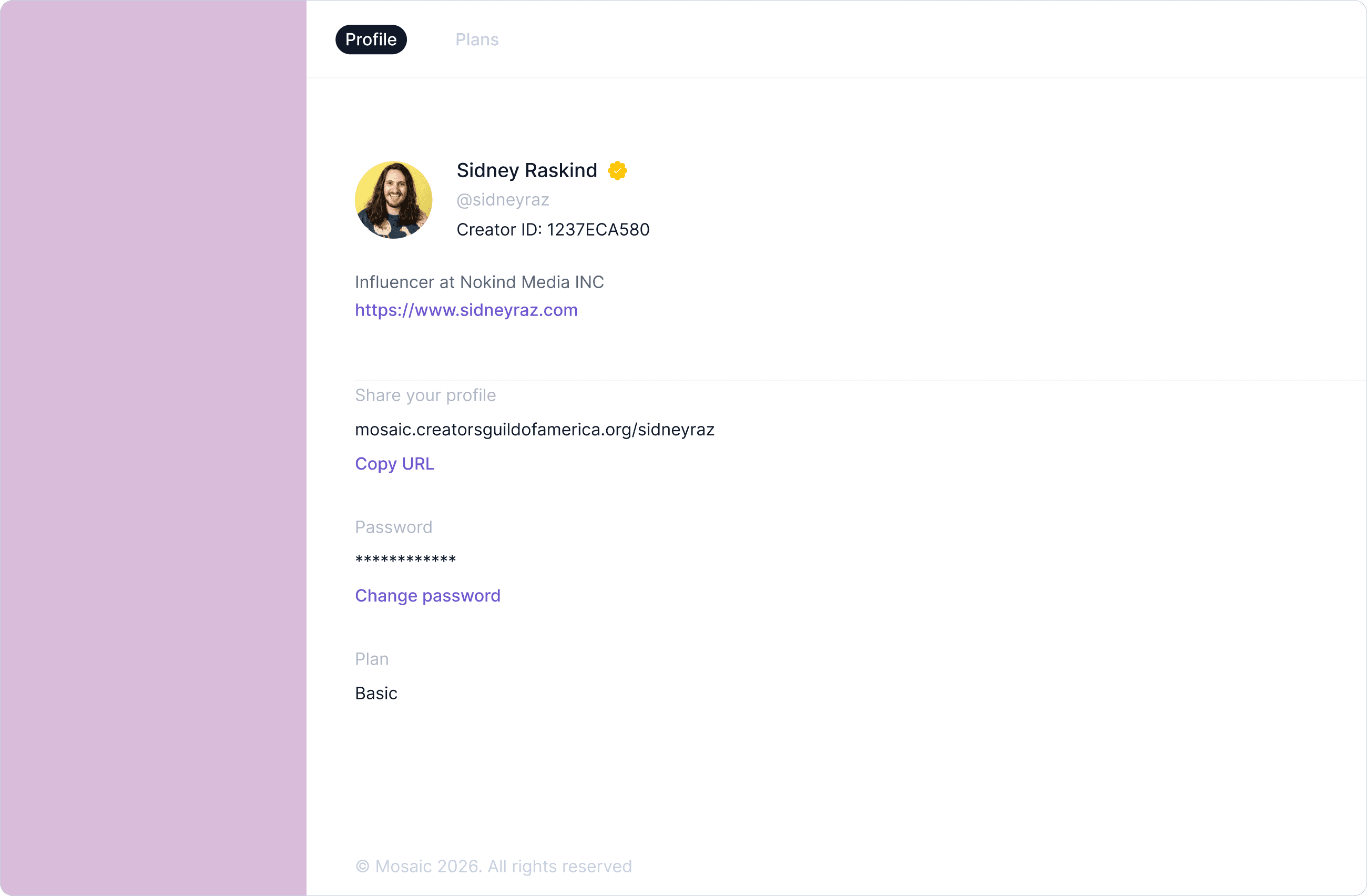
Your Creator ID is your permanent professional identity in the creator economy. It is a unique alphanumeric identifier assigned to you the moment you join Mosaic, and it stays with you for the life of your career regardless of what platforms you use, what clients you work with, or how your work evolves over time.
In an industry where creators have historically had no standardized way to verify who they are or what they have done, your Creator ID changes that. It is your professional mark.
Your Creator ID is your permanent professional identity in the creator economy. It is a unique alphanumeric identifier assigned to you the moment you join Mosaic, and it stays with you for the life of your career regardless of what platforms you use, what clients you work with, or how your work evolves over time.
In an industry where creators have historically had no standardized way to verify who they are or what they have done, your Creator ID changes that. It is your professional mark.
What is Creator ID?
Your Creator ID is a unique alphanumeric code that lives on your Mosaic profile and is attached to every Credit you earn. It functions as a universal identifier for your professional work, one that exists independently of any single platform, brand relationship, or social media account.
Every creator on Mosaic receives a Creator ID automatically upon registration. It appears on your public profile, on each of your Credits, and serves as the anchor point for your entire body of authenticated work.
Think of it the way professionals in other industries use a license number or a guild registration. It is a signal to anyone you work with that you are a verified, credible professional with a documented record to back it up.
Your Creator ID is a unique alphanumeric code that lives on your Mosaic profile and is attached to every Credit you earn. It functions as a universal identifier for your professional work, one that exists independently of any single platform, brand relationship, or social media account.
Every creator on Mosaic receives a Creator ID automatically upon registration. It appears on your public profile, on each of your Credits, and serves as the anchor point for your entire body of authenticated work.
Think of it the way professionals in other industries use a license number or a guild registration. It is a signal to anyone you work with that you are a verified, credible professional with a documented record to back it up.
What does it mean?
Your Creator ID means your work is traceable, your identity is verifiable, and your professional contributions belong to you in a way that cannot be disputed or lost.
When a brand, agency, or collaborator searches for you on Mosaic, your Creator ID ensures they are finding the right person. It eliminates confusion between creators who share similar names and gives your body of work a single, authoritative home.
For CGA Members, your Creator ID is also tied to your membership status and verification, which unlocks additional credibility signals on your profile that the industry can recognize at a glance.
Your Creator ID means your work is traceable, your identity is verifiable, and your professional contributions belong to you in a way that cannot be disputed or lost.
When a brand, agency, or collaborator searches for you on Mosaic, your Creator ID ensures they are finding the right person. It eliminates confusion between creators who share similar names and gives your body of work a single, authoritative home.
For CGA Members, your Creator ID is also tied to your membership status and verification, which unlocks additional credibility signals on your profile that the industry can recognize at a glance.
How can I use it?
Your Creator ID can be used in several practical ways:
Share it on your resume, media kit, or portfolio so that anyone reviewing your work can look you up directly on Mosaic and verify your Credits independently.
Include it in brand partnership proposals or contract negotiations as evidence of your authenticated professional record.
Reference it when applying to industry programs, submitting work for consideration, or establishing your credentials with new clients and collaborators.
As the CGA expands Mosaic's integrations with partner platforms and brands, your Creator ID will become a recognized standard for creator verification across the broader industry. Getting it established now positions you ahead of that shift.
Your Creator ID can be used in several practical ways:
Share it on your resume, media kit, or portfolio so that anyone reviewing your work can look you up directly on Mosaic and verify your Credits independently.
Include it in brand partnership proposals or contract negotiations as evidence of your authenticated professional record.
Reference it when applying to industry programs, submitting work for consideration, or establishing your credentials with new clients and collaborators.
As the CGA expands Mosaic's integrations with partner platforms and brands, your Creator ID will become a recognized standard for creator verification across the broader industry. Getting it established now positions you ahead of that shift.
Verification
Verification
Verification is the highest trust signal available on Mosaic. A verified profile tells every brand, agency, and collaborator who finds you on the platform that your identity has been confirmed, your work is authenticated, and you are a recognized professional member of the Creators Guild of America. In a creator economy increasingly crowded with noise, verification is how you stand apart.
Verification is the highest trust signal available on Mosaic. A verified profile tells every brand, agency, and collaborator who finds you on the platform that your identity has been confirmed, your work is authenticated, and you are a recognized professional member of the Creators Guild of America. In a creator economy increasingly crowded with noise, verification is how you stand apart.
What is Verification?
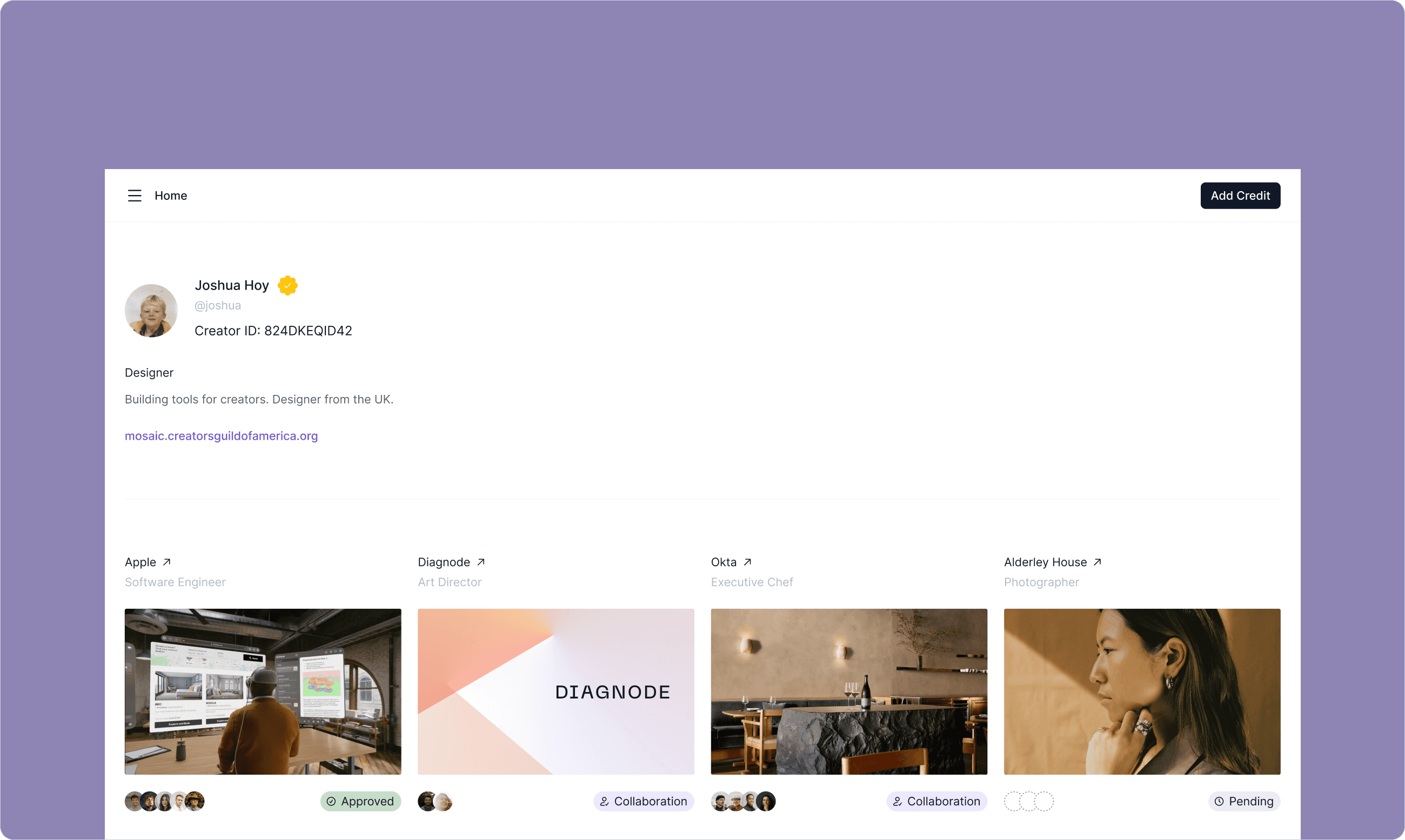
Verification on Mosaic is a status applied to your profile that confirms you are a legitimate, credentialed creator and an active CGA Member in good standing. It appears as a visible badge on your public profile, signaling to anyone who views your work that your identity and contributions have been reviewed and recognized by the CGA. Verification is not automatic. It is earned through CGA Membership and reflects a commitment to professional standards in the creator economy.
Verification on Mosaic is a status applied to your profile that confirms you are a legitimate, credentialed creator and an active CGA Member in good standing. It appears as a visible badge on your public profile, signaling to anyone who views your work that your identity and contributions have been reviewed and recognized by the CGA. Verification is not automatic. It is earned through CGA Membership and reflects a commitment to professional standards in the creator economy.
How do I get Verified?
Verification is unlocked when you become a CGA Member. As a free Associate on Mosaic, you have access to your Creator ID, your public profile, and the ability to create and submit Credits. Upgrading to a CGA Membership activates verification along with a full suite of additional member benefits.
To get verified, visit mosaic.creatorsguildofamerica.org, navigate to your account, click on Plans, and select Become a Member. Select the primary category you would like to apply for; Media, Marketing, or Maker. You will then pay $99 for your annual due. Once your membership is active and processed, your verification badge will appear on your profile in 2 to 3 business days.
Verification is unlocked when you become a CGA Member. As a free Associate on Mosaic, you have access to your Creator ID, your public profile, and the ability to create and submit Credits. Upgrading to a CGA Membership activates verification along with a full suite of additional member benefits.
To get verified, visit mosaic.creatorsguildofamerica.org, navigate to your account, click on Plans, and select Become a Member. Select the primary category you would like to apply for; Media, Marketing, or Maker. You will then pay $99 for your annual due. Once your membership is active and processed, your verification badge will appear on your profile in 2 to 3 business days.
CGA Membership?
CGA Membership is the gateway to everything Mosaic is built to deliver at its fullest level. When you upgrade, you unlock:
Verification: A visible badge on your public Mosaic profile confirming your status as a credentialed CGA Member.
The CGA Rider: A legally binding contract addendum that protects your payments, ownership rights, and AI digestion rights on every brand deal you sign.
Creator Concierge: Direct access to real human support to help you navigate industry challenges, contracts, and opportunities.
Compliance Reporting: The ability to report brand or agency misconduct through the CGA's industry accountability program.
Industry Events: Access to CGA programming, Created by Events, and member-only experiences connecting you with brands, platforms, and fellow creators.
Award Eligibility: Verified Members with accredited Credits become eligible for CGA Awards recognition as the program launches.
Membership is billed annually at $99 and can be cancelled at any time through the Manage Plan option in your account settings.
CGA Membership is the gateway to everything Mosaic is built to deliver at its fullest level. When you upgrade, you unlock:
Verification: A visible badge on your public Mosaic profile confirming your status as a credentialed CGA Member.
The CGA Rider: A legally binding contract addendum that protects your payments, ownership rights, and AI digestion rights on every brand deal you sign.
Creator Concierge: Direct access to real human support to help you navigate industry challenges, contracts, and opportunities.
Compliance Reporting: The ability to report brand or agency misconduct through the CGA's industry accountability program.
Industry Events: Access to CGA programming, Created by Events, and member-only experiences connecting you with brands, platforms, and fellow creators.
Award Eligibility: Verified Members with accredited Credits become eligible for CGA Awards recognition as the program launches.
Membership is billed annually at $99 and can be cancelled at any time through the Manage Plan option in your account settings.
Account & Management
Account Management
Your Mosaic account is the control center for your professional presence on the platform. From here you can update your profile, manage your Credits, and control your membership status at any time.
Your Mosaic account is the control center for your professional presence on the platform. From here you can update your profile, manage your Credits, and control your membership status at any time.
Your Account Settings
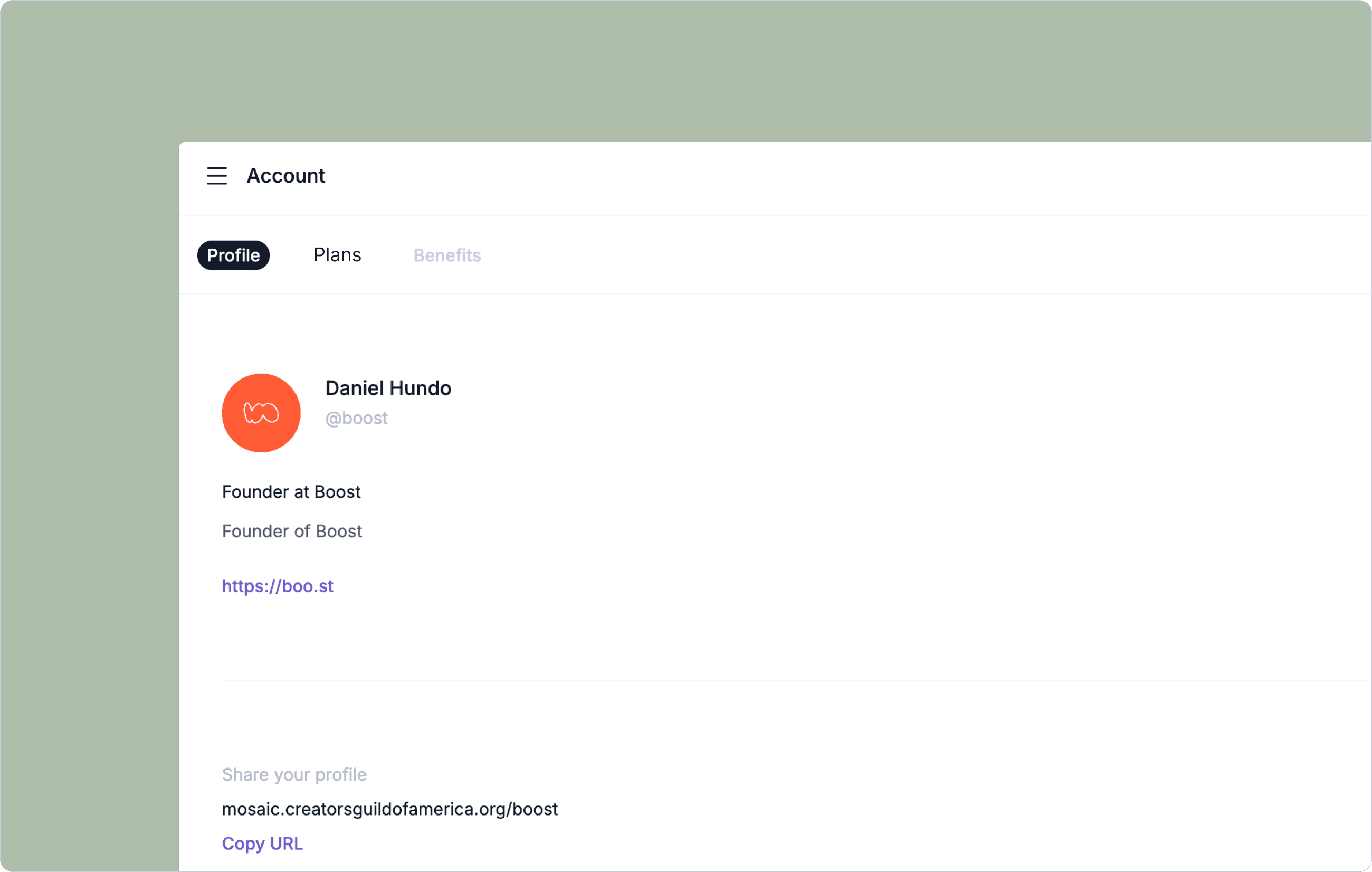
To access your account settings, click the menu icon in the top left corner of your Mosaic profile. From there you can update your name, username, bio, role, profile photo, external link, and password. Keeping your profile current ensures that anyone who finds you on Mosaic is seeing an accurate and up to date representation of your professional identity.
To access your account settings, click the menu icon in the top left corner of your Mosaic profile. From there you can update your name, username, bio, role, profile photo, external link, and password. Keeping your profile current ensures that anyone who finds you on Mosaic is seeing an accurate and up to date representation of your professional identity.
Becoming a Member
Mosaic is free to join as an Associate. As an Associate you receive your Creator ID, a public profile, and the ability to create and submit Credits for authentication.
To unlock the full power of Mosaic and the CGA, upgrade to a CGA Membership. Membership is available directly through your Mosaic account at mosaic.creatorsguildofamerica.org. Navigate to your account settings and select Upgrade to Member to get started.
Membership is billed annually at $99.
Mosaic is free to join as an Associate. As an Associate you receive your Creator ID, a public profile, and the ability to create and submit Credits for authentication.
To unlock the full power of Mosaic and the CGA, upgrade to a CGA Membership. Membership is available directly through your Mosaic account at mosaic.creatorsguildofamerica.org. Navigate to your account settings and select Upgrade to Member to get started.
Membership is billed annually at $99.
Managing Your Membership
Once you complete your membership upgrade, your account will begin processing. Here is what to expect:
Processing takes 2 to 3 business days. During this time the CGA team reviews your account and activates your membership benefits.
Once processing is complete, your verification badge will appear on your public Mosaic profile, visible to anyone who views your page. You will receive a confirmation email when your membership is fully active and all benefits have been unlocked.
From that point forward you will have access to the full Benefits section within your account, which contains your member-only services including the CGA Rider, Creator Concierge, Compliance reporting, event access, and award eligibility as programs become available.
Once you complete your membership upgrade, your account will begin processing. Here is what to expect:
Processing takes 2 to 3 business days. During this time the CGA team reviews your account and activates your membership benefits.
Once processing is complete, your verification badge will appear on your public Mosaic profile, visible to anyone who views your page. You will receive a confirmation email when your membership is fully active and all benefits have been unlocked.
From that point forward you will have access to the full Benefits section within your account, which contains your member-only services including the CGA Rider, Creator Concierge, Compliance reporting, event access, and award eligibility as programs become available.
Your Benefits Section
Once your membership is active, a Benefits section will appear in your account navigation. This is your exclusive member hub. Inside you will find:
Your CGA Rider documentation and instructions for use on brand deals and contracts. Access to Creator Concierge support for professional guidance and assistance. Compliance reporting tools for flagging industry misconduct. Information on upcoming CGA events and member programming. Updates on Accreditation and Awards eligibility as those programs roll out.
This section is only accessible to active CGA Members. If you are an Associate and attempt to access Benefits, you will be prompted to upgrade your membership.
Once your membership is active, a Benefits section will appear in your account navigation. This is your exclusive member hub. Inside you will find:
Your CGA Rider documentation and instructions for use on brand deals and contracts. Access to Creator Concierge support for professional guidance and assistance. Compliance reporting tools for flagging industry misconduct. Information on upcoming CGA events and member programming. Updates on Accreditation and Awards eligibility as those programs roll out.
This section is only accessible to active CGA Members. If you are an Associate and attempt to access Benefits, you will be prompted to upgrade your membership.
Canceling Your Membership
You can cancel your CGA Membership at any time. To cancel, navigate to your account settings, select Manage Plan, and follow the cancellation steps. Your membership benefits will remain active through the end of your current billing period. After that your account will revert to Associate status and your verification badge will be removed from your profile. Your Creator ID, your Credits, and your public profile will remain intact. Your work is always yours.
You can cancel your CGA Membership at any time. To cancel, navigate to your account settings, select Manage Plan, and follow the cancellation steps. Your membership benefits will remain active through the end of your current billing period. After that your account will revert to Associate status and your verification badge will be removed from your profile. Your Creator ID, your Credits, and your public profile will remain intact. Your work is always yours.
FAQs
Why do I have to use a company's domain name?
Mosaic is built to document professional work between business entities. To maintain that standard, all Credit authentication must come from an email address connected to a verified company domain. Personal email addresses including Gmail, Yahoo, Hotmail, and AOL are not accepted.
This is intentional. Every authenticated Credit on Mosaic displays the domain that verified it, and that domain is part of what gives your Credit its credibility. A Credit authenticated by nike.com, a24.com, or your agency's domain carries professional weight that a personal email address simply cannot provide. The higher the caliber of the authenticating domain, the stronger your professional record becomes.
This requirement exists to protect the integrity of every creator on the platform, including yours.
Mosaic is built to document professional work between business entities. To maintain that standard, all Credit authentication must come from an email address connected to a verified company domain. Personal email addresses including Gmail, Yahoo, Hotmail, and AOL are not accepted.
This is intentional. Every authenticated Credit on Mosaic displays the domain that verified it, and that domain is part of what gives your Credit its credibility. A Credit authenticated by nike.com, a24.com, or your agency's domain carries professional weight that a personal email address simply cannot provide. The higher the caliber of the authenticating domain, the stronger your professional record becomes.
This requirement exists to protect the integrity of every creator on the platform, including yours.
Can I approve my own credit?
Yes, under certain conditions. If you are a founder, freelancer, or sole proprietor who operates under your own company with a unique business domain, you can list yourself as the Credit Approver using your company email address. The domain must be a registered business domain. Personal email services will not be accepted regardless of how they are used.
This is a practical option for creators who have done legitimate professional work through their own entity and want that work represented on their Mosaic profile.
Yes, under certain conditions. If you are a founder, freelancer, or sole proprietor who operates under your own company with a unique business domain, you can list yourself as the Credit Approver using your company email address. The domain must be a registered business domain. Personal email services will not be accepted regardless of how they are used.
This is a practical option for creators who have done legitimate professional work through their own entity and want that work represented on their Mosaic profile.
What if I want credits from earlier in my career?
Mosaic authenticates work through a live, peer to peer process between you and a current contact at the company where the work was completed. There is no backdating system and Credits cannot be retroactively authenticated through historical records alone.
If you completed work for a company earlier in your career and still have a professional contact there who can verify your contribution, you can submit that Credit now and list them as the approver. The date issued will reflect when the Credit was authenticated, not when the work originally took place.
For work completed under your own business entity, the self-assign option described above may serve as a practical workaround for documenting your independent professional history.
Mosaic authenticates work through a live, peer to peer process between you and a current contact at the company where the work was completed. There is no backdating system and Credits cannot be retroactively authenticated through historical records alone.
If you completed work for a company earlier in your career and still have a professional contact there who can verify your contribution, you can submit that Credit now and list them as the approver. The date issued will reflect when the Credit was authenticated, not when the work originally took place.
For work completed under your own business entity, the self-assign option described above may serve as a practical workaround for documenting your independent professional history.
What if a Credit Approver has left the company?
If the person you listed as your Credit Approver is no longer at the company, the authentication cannot be completed through them. You will need to start the submission over with a new approver who is currently at the organization and has firsthand knowledge of your contribution.
\
Credit authentication is a peer to peer process. Each submission is tied to a specific approver, so a new contact requires a fresh submission. Take a moment to identify the right person before resubmitting to avoid another lapse.
If the person you listed as your Credit Approver is no longer at the company, the authentication cannot be completed through them. You will need to start the submission over with a new approver who is currently at the organization and has firsthand knowledge of your contribution.
Credit authentication is a peer to peer process. Each submission is tied to a specific approver, so a new contact requires a fresh submission. Take a moment to identify the right person before resubmitting to avoid another lapse.
What if the Credit Approver never responds?
If your Credit Approver does not take action within 7 days of receiving the authentication request, your pending Credit will be automatically removed from your profile. You will receive a notification when this happens.
You are welcome to resubmit at any time. Before doing so, consider reaching out to your approver directly to let them know the request is coming. A brief heads up significantly increases the chance of a timely response. Including a personal note when submitting your Credit also helps the approver understand what they are being asked to confirm and why it matters.
If your Credit Approver does not take action within 7 days of receiving the authentication request, your pending Credit will be automatically removed from your profile. You will receive a notification when this happens.
You are welcome to resubmit at any time. Before doing so, consider reaching out to your approver directly to let them know the request is coming. A brief heads up significantly increases the chance of a timely response. Including a personal note when submitting your Credit also helps the approver understand what they are being asked to confirm and why it matters.
Do I have to be a CGA Member for my Credits?
No. Your Credits and their authentication status are never affected by your membership level. Whether you are a free Associate or an active CGA Member, every Credit you have earned remains fully intact, authenticated, and visible on your public profile. Membership unlocks additional benefits and your verification badge, but it has no bearing on your professional record.
No. Your Credits and their authentication status are never affected by your membership level. Whether you are a free Associate or an active CGA Member, every Credit you have earned remains fully intact, authenticated, and visible on your public profile. Membership unlocks additional benefits and your verification badge, but it has no bearing on your professional record.
What are CGA Awards & Accreditation?
The CGA Awards program is coming. It will recognize outstanding professional work across the creator economy, with eligibility tied to Credits that have been reviewed and accredited through the CGA Accreditation program. Details on categories, timelines, and the nomination process will be announced to members ahead of the launch. Stay tuned.
The CGA Awards program is coming. It will recognize outstanding professional work across the creator economy, with eligibility tied to Credits that have been reviewed and accredited through the CGA Accreditation program. Details on categories, timelines, and the nomination process will be announced to members ahead of the launch. Stay tuned.
For everything else?
Please contact the CGA support team directly. CGA Members also have access to Creator Concierge, which connects you with real human support for more complex questions and professional guidance.
Please contact the CGA support team directly. CGA Members also have access to Creator Concierge, which connects you with real human support for more complex questions and professional guidance.
The Creators Guild of America is the official 501(c)(6) non profit organization that protects and promotes the interests of digital creators.
The Creators Guild of America is the official 501(c)(6) non profit organization that protects and promotes the interests of digital creators.
Footnotes
Our eligibility requirements are thoughtfully crafted by a diverse committee of creative professionals from all backgrounds, ensuring inclusivity and representation across the industry.
We proudly support members from all cultures, ethnicities, and backgrounds. As a Guild, we stand with the LGBTQ+ community and are committed to fostering an environment of equality and acceptance for all.
As a non-profit organization, the dues paid by our members are reinvested into the Guild to fund events, legal costs, and continuous improvements, making sure to look after our volunteers and ensuring a vibrant future for all creators.
Creators Guild of America © 2025